

1. Obtain Merchant Self-Service Platform Account
After the partnership is confirmed, HaiPay will create an administrator account for the merchant to log into the Merchant Management Self-Service Platform, based on the “Administrator Account Information” filled out in the “Merchant Access Application Form.” Please pay attention to the activation email sent by HaiPay. The merchant can activate the administrator account according to the instructions in the email. The first login will require a password change, so please ensure the password is secure to prevent leakage.2. Obtain appId and Secret Key
The merchant’s appId required for integration testing can be obtained from the Merchant Management Platform. The signature uses the SHA256WithRSA signing algorithm, and the merchant needs to generate the public and private key pair themselves. The public key must be uploaded to the Merchant Management Platform, and HaiPay’s public key should also be downloaded. Please securely store the key information. If the key is leaked, it should be updated immediately. Configuration entry: “Business Management” - “Payment Product Configuration”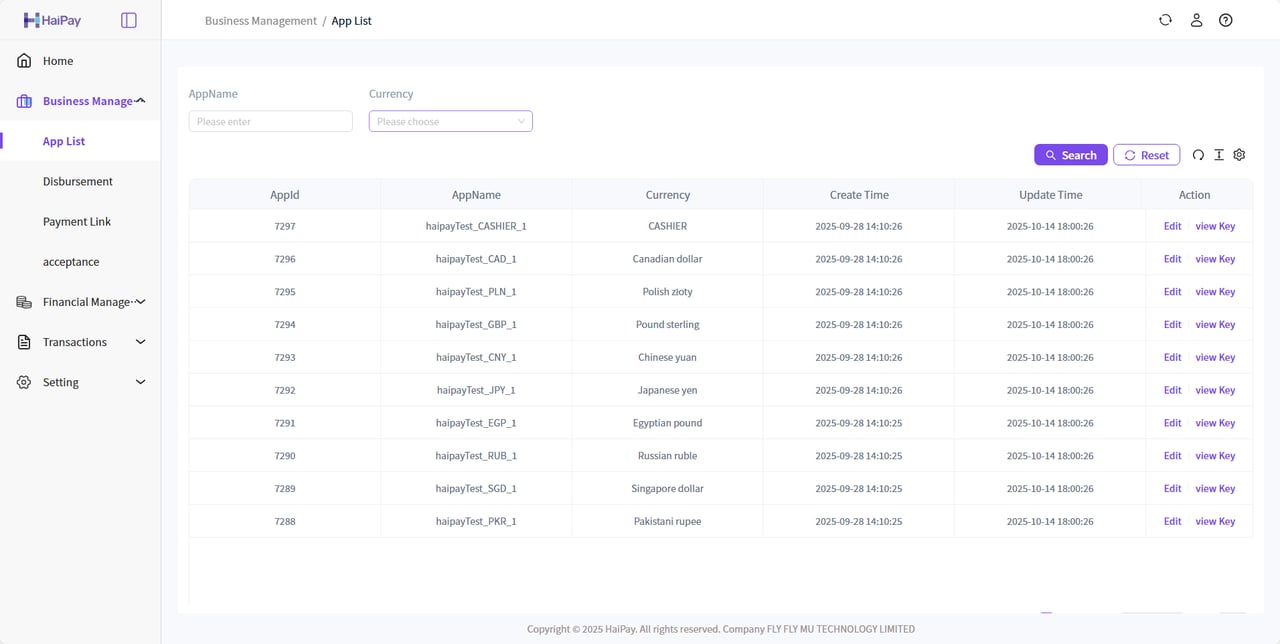
The merchant’s appId and secret key are paired, distinguished by currency, and differentiated between the test environment and the production environment.
3. Public Key and Private Key Configuration
3.1 Role of Public and Private Keys
3.2 Generating Public and Private Keys
The private key should be securely stored, and the public key should be added to the HaiPay backend. Remove the-----BEGIN XXX KEY----- and -----END XXX KEY----- parts, along with any newlines and spaces.
Method 1: Use OpenSSL to Generate Keys
Refer to online examples; OpenSSL needs to be installed, and the key length should be 2048 bits.Method 2: Generate Keys Online
You can generate key pairs using the HaiPay Developer Tools, which are implemented purely in JavaScript and will not interact with the HaiPay server, ensuring that merchant key information is not leaked. Generates addresses can be found in here.Method 3: Generate Keys via Code
Merchants can generate public and private keys using the following SDK. The merchant’s private key should be securely stored and used for signing requests to HaiPay. The merchant’s public key should be uploaded to the platform for HaiPay to verify the merchant’s signature to prevent tampering during transmission. Additionally, the HaiPay public key should be obtained from the platform and integrated into the merchant’s system for verifying the HaiPay-signed messages.Show Generate key
Show Generate key
/**
 * Generates a 2048-bit RSA key pair and converts the public and private keys to PEM format.
 *
 * @return A Map containing the public and private keys, with keys "publicKey" and "privateKey".
 */
public static Map<String, String> generateRSAKeyPair() {
    try {
        // Create KeyPairGenerator object and specify RSA algorithm
        KeyPairGenerator keyPairGenerator = KeyPairGenerator.getInstance("RSA");

        // Initialize the key length to 2048 bits
        keyPairGenerator.initialize(2048);

        // Generate the key pair
        KeyPair keyPair = keyPairGenerator.generateKeyPair();

        // Retrieve the public and private keys
        PublicKey publicKey = keyPair.getPublic();
        PrivateKey privateKey = keyPair.getPrivate();

        // Convert the public and private keys to PEM format
        String publicKeyPem = convertPublicKeyToPEM(publicKey);
        String privateKeyPem = convertPrivateKeyToPEM(privateKey);

        // Store the public and private keys in a Map
        Map<String, String> keyPairMap = new HashMap<>();
        keyPairMap.put("publicKey", publicKeyPem);
        keyPairMap.put("privateKey", privateKeyPem);
        return keyPairMap;

    } catch (NoSuchAlgorithmException e) {
        throw new RuntimeException("Failed to generate RSA key pair", e);
    }
}

/**
 * Converts the public key to PEM format.
 *
 * @param publicKey The public key object.
 * @return The public key as a PEM formatted string.
 */
private static String convertPublicKeyToPEM(PublicKey publicKey) {
    String encodedPublicKey = Base64.getMimeEncoder(64, "\n".getBytes())
            .encodeToString(publicKey.getEncoded());
    return "-----BEGIN PUBLIC KEY-----\n"
            + encodedPublicKey
            + "\n-----END PUBLIC KEY-----";
}

/**
 * Converts the private key to PEM format.
 *
 * @param privateKey The private key object.
 * @return The private key as a PEM formatted string.
 */
private static String convertPrivateKeyToPEM(PrivateKey privateKey) {
    String encodedPrivateKey = Base64.getMimeEncoder(64, "\n".getBytes())
            .encodeToString(privateKey.getEncoded());
    return "-----BEGIN PRIVATE KEY-----\n"
            + encodedPrivateKey
            + "\n-----END PRIVATE KEY-----";
}
/**
 * Initialize RSA key pair.
 *
 * @param int $keysize RSA 1024 is insecure, recommended size is 2048
 *
 * Usage example:
 * Call the function to generate an RSA key pair with a key length of 2048 bits:
    $result = initRSAKey(2048);

    echo "Private Key:\n";
    echo $result['private_key'] . "\n";

    echo "Public Key:\n";
    echo $result['public_key'] . "\n";
 */
public function initRSAKey($keysize) {
    $config = array(
        "digest_alg" => "sha256",
        "private_key_bits" => $keysize,
        "private_key_type" => OPENSSL_KEYTYPE_RSA,
    );
    // Generate a new RSA key pair using SHA256 algorithm
    $rsaKey = openssl_pkey_new($config);

    // Export the private key
    openssl_pkey_export($rsaKey, $privateKey);

    // Get the public key
    $publicKey = openssl_pkey_get_details($rsaKey);
    $publicKey = $publicKey["key"];

    return array(
        'public_key' => $publicKey,
        'private_key' => $privateKey
    );
}
4. Signature
| Type | Description |
|---|---|
| Algorithm | RSA |
| Signature Algorithm | SHA256WithRSA |
| Key Length | 2048 |
null nor "". Exclude the sign and sign_type fields, sort the remaining field names in ASCII ascending order, and concatenate each key and value in the format k1=v1&k2=v2&.... Append &key=merchantSecretKey (the merchant secret key configured in the Merchant Management Platform) to form the string to be signed.
The merchant signs the string to be signed with its RSA private key using SHA256WithRSA to produce the signature string.
The string
"null", strings containing only whitespace, 0, and false all participate in signing.Only
null and the empty string "" are excluded from signing.When verifying a signature, use the business object that contains
sign and include every valid field in that object, including fields added in later API versions; do not verify against a fixed field list. For synchronous responses with a wrapper, verify the documented data or business object only, rather than wrapper fields such as status, error, or msg.Encode the string to be signed as UTF-8 bytes before performing
SHA256WithRSA signing or verification.merchantSecretKey and the merchant RSA private key are sensitive information. Do not place them in frontend code, client applications, logs, or public repositories.Show Signature Tool
Show Signature Tool
import lombok.extern.slf4j.Slf4j;
import org.apache.tomcat.util.http.fileupload.IOUtils;

import javax.crypto.Cipher;
import java.io.ByteArrayOutputStream;
import java.nio.charset.Charset;
import java.nio.charset.StandardCharsets;
import java.security.Key;
import java.security.KeyFactory;
import java.security.KeyPair;
import java.security.KeyPairGenerator;
import java.security.NoSuchAlgorithmException;
import java.security.PrivateKey;
import java.security.PublicKey;
import java.security.Signature;
import java.security.spec.PKCS8EncodedKeySpec;
import java.security.spec.X509EncodedKeySpec;
import java.util.Base64;
import java.util.HashMap;
import java.util.Map;

/**
 * @ClassName SHA256WithRSAUtils
 * @Description (SHA256WithRSA Signature Utility Class)
 * @Author Finlay
 * @Date 2021-02-01
 * @Version 1.0.0
 */
@Slf4j
public class SHA256WithRSAUtils {

    public static final Charset CHARSET = StandardCharsets.UTF_8;
    /**
     * Key Algorithm
     */
    public static final String ALGORITHM_RSA = "RSA";
    /**
     * RSA Signature Algorithm
     */
    public static final String ALGORITHM_RSA_SIGN = "SHA256WithRSA";
    public static final int ALGORITHM_RSA_PRIVATE_KEY_LENGTH = 2048;

    private SHA256WithRSAUtils() {
    }

    /**
     * RSA Algorithm Public Key Encryption
     *
     * @param data The plain text string to be encrypted
     * @param key  RSA public key string
     * @return The encrypted cipher text string, encoded in Base64
     */
    public static String buildRSAEncryptByPublicKey(String data, String key) {
        try {
            // Get the public key object through X509-encoded Key instruction
            X509EncodedKeySpec x509KeySpec = new X509EncodedKeySpec(Base64.getDecoder().decode(key));
            KeyFactory keyFactory = KeyFactory.getInstance(ALGORITHM_RSA);
            Key publicKey = keyFactory.generatePublic(x509KeySpec);
            Cipher cipher = Cipher.getInstance(keyFactory.getAlgorithm());
            cipher.init(Cipher.ENCRYPT_MODE, publicKey);
            return Base64.getEncoder().encodeToString(rsaSplitCodec(cipher, Cipher.ENCRYPT_MODE, data.getBytes(CHARSET)));
        } catch (Exception e) {
            throw new RuntimeException("An error occurred while encrypting the string [" + data + "]", e);
        }
    }

    /**
     * RSA Algorithm Public Key Decryption
     *
     * @param data The Base64-encoded cipher text string to be decrypted
     * @param key  RSA public key string
     * @return The decrypted plain text string
     */
    public static String buildRSADecryptByPublicKey(String data, String key) {
        try {
            // Get the public key object through X509-encoded Key instruction
            X509EncodedKeySpec x509KeySpec = new X509EncodedKeySpec(Base64.getDecoder().decode(key));
            KeyFactory keyFactory = KeyFactory.getInstance(ALGORITHM_RSA);
            Key publicKey = keyFactory.generatePublic(x509KeySpec);
            Cipher cipher = Cipher.getInstance(keyFactory.getAlgorithm());
            cipher.init(Cipher.DECRYPT_MODE, publicKey);
            return new String(rsaSplitCodec(cipher, Cipher.DECRYPT_MODE, Base64.getDecoder().decode(data)), CHARSET);
        } catch (Exception e) {
            throw new RuntimeException("An error occurred while decrypting the string [" + data + "]", e);
        }
    }

    /**
     * RSA Algorithm Private Key Encryption
     *
     * @param data The plain text string to be encrypted
     * @param key  RSA private key string
     * @return The encrypted cipher text string, encoded in Base64
     */
    public static String buildRSAEncryptByPrivateKey(String data, String key) {
        try {
            // Get the private key object through PKCS#8-encoded Key instruction
            PKCS8EncodedKeySpec pkcs8KeySpec = new PKCS8EncodedKeySpec(Base64.getDecoder().decode(key));
            KeyFactory keyFactory = KeyFactory.getInstance(ALGORITHM_RSA);
            Key privateKey = keyFactory.generatePrivate(pkcs8KeySpec);
            Cipher cipher = Cipher.getInstance(keyFactory.getAlgorithm());
            cipher.init(Cipher.ENCRYPT_MODE, privateKey);
            return Base64.getEncoder().encodeToString(rsaSplitCodec(cipher, Cipher.ENCRYPT_MODE, data.getBytes(CHARSET)));
        } catch (Exception e) {
            throw new RuntimeException("An error occurred while encrypting the string [" + data + "]", e);
        }
    }

    /**
     * RSA Algorithm Private Key Decryption
     *
     * @param data The Base64-encoded cipher text string to be decrypted
     * @param key  RSA private key string
     * @return The decrypted plain text string
     */
    public static String buildRSADecryptByPrivateKey(String data, String key) {
        try {
            // Get the private key object through PKCS#8-encoded Key instruction
            PKCS8EncodedKeySpec pkcs8KeySpec = new PKCS8EncodedKeySpec(Base64.getDecoder().decode(key));
            KeyFactory keyFactory = KeyFactory.getInstance(ALGORITHM_RSA);
            Key privateKey = keyFactory.generatePrivate(pkcs8KeySpec);
            Cipher cipher = Cipher.getInstance(keyFactory.getAlgorithm());
            cipher.init(Cipher.DECRYPT_MODE, privateKey);
            return new String(rsaSplitCodec(cipher, Cipher.DECRYPT_MODE, Base64.getDecoder().decode(data)), CHARSET);
        } catch (Exception e) {
            throw new RuntimeException("An error occurred while decrypting the string [" + data + "]", e);
        }
    }

    /**
     * RSA Algorithm Private Key Digital Signature Generation
     *
     * @param data The plain text string to be signed
     * @param key  RSA private key string
     * @return The Base64-encoded signed string using RSA private key
     */
    public static String buildRSASignByPrivateKey(String data, String key) {
        try {
            // Get the private key object through PKCS#8-encoded Key instruction
            PKCS8EncodedKeySpec pkcs8KeySpec = new PKCS8EncodedKeySpec(Base64.getDecoder().decode(key));
            KeyFactory keyFactory = KeyFactory.getInstance(ALGORITHM_RSA);
            PrivateKey privateKey = keyFactory.generatePrivate(pkcs8KeySpec);
            Signature signature = Signature.getInstance(ALGORITHM_RSA_SIGN);
            signature.initSign(privateKey);
            signature.update(data.getBytes(CHARSET));
            return Base64.getEncoder().encodeToString(signature.sign());
        } catch (Exception e) {
            throw new RuntimeException("An error occurred while signing the string [" + data + "]", e);
        }
    }

    /**
     * RSA Algorithm Public Key Signature Verification
     *
     * @param data  The plain text string that was signed
     * @param key   RSA public key string
     * @param sign  The Base64-encoded signature string obtained from RSA signing
     * @return true--signature verified, false--signature verification failed
     */
    public static boolean buildRSAverifyByPublicKey(String data, String key, String sign) {
        try {
            // Get the public key object through X509-encoded Key instruction
            X509EncodedKeySpec x509KeySpec = new X509EncodedKeySpec(Base64.getDecoder().decode(key));
            KeyFactory keyFactory = KeyFactory.getInstance(ALGORITHM_RSA);
            PublicKey publicKey = keyFactory.generatePublic(x509KeySpec);
            Signature signature = Signature.getInstance(ALGORITHM_RSA_SIGN);
            signature.initVerify(publicKey);
            signature.update(data.getBytes(CHARSET));
            return signature.verify(Base64.getDecoder().decode(sign));
        } catch (Exception e) {
            e.printStackTrace();
        }
    }

    /**
     * RSA Algorithm for Chunked Encryption/Decryption of Data
     *
     * @param cipher The javax.crypto.Cipher object initialized with the encryption/decryption mode
     * @param opmode The operation mode (Cipher.ENCRYPT_MODE / Cipher.DECRYPT_MODE)
     * @return The byte array of encrypted or decrypted data
     */
    private static byte[] rsaSplitCodec(Cipher cipher, int opmode, byte[] datas) {
        int maxBlock = 0;
        if (opmode == Cipher.DECRYPT_MODE) {
            maxBlock = ALGORITHM_RSA_PRIVATE_KEY_LENGTH / 8;
        } else {
            maxBlock = ALGORITHM_RSA_PRIVATE_KEY_LENGTH / 8 - 11;
        }
        ByteArrayOutputStream out = new ByteArrayOutputStream();
        int offSet = 0;
        byte[] buff;
        int i = 0;
        try {
            while (datas.length > offSet) {
                if (datas.length - offSet > maxBlock) {
                    buff = cipher.doFinal(datas, offSet, maxBlock);
                } else {
                    buff = cipher.doFinal(datas, offSet, datas.length - offSet);
                }
                out.write(buff, 0, buff.length);
                i++;
                offSet = i * maxBlock;
            }
        } catch (Exception e) {
            throw new RuntimeException("An error occurred while encrypting/decrypting data with the threshold [" + maxBlock + "]", e);
        }
        byte[] resultDatas = out.toByteArray();
        IOUtils.closeQuietly(out);
        return resultDatas;
    }
}
/*Usage examples
require 'SHA256WithRSAUtils.php';
$rsa = new SHA256WithRSAUtils();
$publicKey = 'MIIBIjANBgkqhkiG9w0BAQEFAAOCAQ8AMIIBCgKCAQEAiqoMbM2+Dm7qCeVPA3c9srThRXPNX5p4kRaPo7zbaznoDFKXfYAT7zBGgc3XiQu+AoPx7ABO3/btuADy4tKC2GQsLYYbNNcUyIQIrPIeyGAknVq3G5/IKQe2qUnuFHdHUus5LkXA01RrCza8zTjCh30/Etd3bbKg8gwQYUqZAcHvU5Hi0AfCuWYw2CfLk7bK3HsveXjRXttq/KgIb+etslAUxtD42aUJoiVg9E+lESy8zWBDlxM7FVWYDygTVklWbzIy4N9nhb/9jMPsfN5+OMN/RS8ehN+OwOYVUGFmwS7hw8hVM1v3p3TpjEo9WCZhg4XLYBCvlCANWzW3sWKN9wIDAQAB';
$privateKey = 'MIIEvgIBADANBgkqhkiG9w0BAQEFAASCBKgwggSkAgEAAoIBAQCKqgxszb4ObuoJ5U8Ddz2ytOFFc81fmniRFo+jvNtrOegMUpd9gBPvMEaBzdeJC74Cg/HsAE7f9u24APLi0oLYZCwthhs01xTIhAis8h7IYCSdWrcbn8gpB7apSe4Ud0dS6zkuRcDTVGsLNrzNOMKHfT8S13dtsqDyDBBhSpkBwe9TkeLQB8K5ZjDYJ8uTtsrcey95eNFe22r8qAhv562yUBTG0PjZpQmiJWD0T6URLLzNYEOXEzsVVZgPKBNWSVZvMjLg32eFv/2Mw+x83n44w39FLx6E347A5hVQYWbBLuHDyFUzW/endOmMSj1YJmGDhctgEK+UIA1bNbexYo33AgMBAAECggEAZlZ6NRLjYeOZ9xO17OjkMDAu0gNVX2mx8eKkwENx7QEfsXiDNayBCdanMsWofQydf13B/lt72u9zIooQuDaFOw8zS6XeDnFudU582KcY8OmEHF4HJewW3bFDrk1R2OjvStMvsGbqmQ2EsxIC5bMuXrChDFbZXayn+/vLWwKjShetqPkN2cRHcKWaASqOnWOAnpgHm5VuGu2ttaR5K14pmMq7a0TOaj7lDYyHelWejCfqFFiWfYLefNj3oFVAfiNxwsxj8q42xWwPZ/Xzhn8p0cInja//1AMuNLIadyC4r6VR7cOIKm4F7XwCTCRCSmPbhDu5pOEA//pERFTTNtE7gQKBgQDdzbujAJRqkn0WwPtbKE7ZxR2KFjc4fM1LyPyODz4tbXhtXtZeMcjjsKn8pTpzbgj+Cfmhz9X8sKAqdxe1WJTtkgg5zbvPQ8A+Q0Su19LZMfFCuC0RCp1SX/asl4XeQe6fQZCft3AG7RgA5HjHET0/7Mpwb3C7A/xBwMfn51T0+wKBgQCgCuy9NmpG2bG/MEz1gDojYe08yKOGgTLp6v/UZcn+U6Oit37/sFe0vU7n9NMtkCLdhf2mqF1cNCUv+rzHkvtgG8FaNlsuozOMXuTNCJ6nj/IypMOnU8vV9DL9zUq5cUnny7HKwCTuS8FYZTjI75GfDDwrxIhhzOIkh2leQD+iNQKBgDV1xOgA18ToEeZOFUdfa8HpVLlXqW+gBQtjIhxLaD0iyYfy99A0R6s5hX8zg+cWemxgkx6BLZ5+I9yYX8qB00N/kyP7hmzqc4eORxutQVDATNo78gDNgiW8o4Pt8YIkehNAhk84s3O36bUtXD7+1Lh3pkN7WLx6tW5TvNsUUtHJAoGBAIYOoJ8dpYgTccAkRVKfRhO9Q2tW5SMVtgAayJCxcrGGfdseuVKT8+OBb0b83KedxJaqVf3zqcBCLaQy80543/dxSFS4k0hNjDBYjG7yeXMCMG4bdYgDuQpOsyfFfoI3UyDGjva2XDj/W8UfhKFLiz8ekIhY56SEaikPBEPerW7BAoGBAIW+5xD7BH4Z/w+GNrA5WFWNNH02+32AD/k6W59GQ+ejrFzCa9/SPa/7WEbBjKNWnzYl9pcdA0lP3LGEbKzrm6Zy+6lCHI6Hx/o4PbHaKTQg2jAIJdEUrAOKR44rjIY41a8wtgilfZA4I4zDSvJMPkMYOItIXjFCwHTxLLfw0CJp';
$decoded = 'eA8//4cK0DZvrOHrfc8vmr5htYqrb8k6gZiZtXAkSoLHOBkgsknRi8SP5YsYar7xXUSOo2b2LLOHB31JlOfXnH5vxIoG6/rHjkPagKA4r8+8cIp6glGou5f41ONJcsMoUPxThgsI+eTe4HxBUKlkjZ/6hh/WSdfcn8lRGGjBmOL5IqRGtvHQBNiJ9l7diezVPhQKZ+YGLOnmH6f+AKNM9/lY+2BWojsLcbLntUr9FGOIkrSf4GiYpWzVRsVOaqY4qmq+1be8qlvA7/MP+bWYCxDtk1OrZh852M4m0LEQosu8rtsalUZhgktBxhmMSR4I6z7e1KkaZdD4Y4iR+AU1Bg==';
$content = 'amount=200¤cy=PHP&merId=1000&orderId=M1234567904&key=WFZflvcV75jYP2G6QIpSsMtoX1e4awxO';
//$data = $rsa->buildRSAverifyByPublicKey($content,$publicKey,$decoded);
$data = $rsa->buildRSASignByPrivateKey($content,$privateKey);
var_dump($data)
*/
class SHA256WithRSAUtils
{
/**
* Initialize RSA Algorithm Key Pair
*
* @param int $keysize RSA 1024 is already insecure, it is recommended to use 2048
*
* Example usage:
* Call the function to generate RSA key pair with the key length set to 2048 bits
$result = initRSAKey(2048);
echo "Private Key:\n";
echo $result['private_key'] . "\n";
echo "Public Key:\n";
echo $result['public_key'] . "\n";
*/
public function initRSAKey($keysize) {
$config = array(
"digest_alg" => "sha256",
"private_key_bits" => $keysize,
"private_key_type" => OPENSSL_KEYTYPE_RSA,
);
// Generate a new RSA key pair using SHA256 algorithm
$rsaKey = openssl_pkey_new($config);
// Get the private key
openssl_pkey_export($rsaKey, $privateKey);
// Get the public key
$publicKey = openssl_pkey_get_details($rsaKey);
$publicKey = $publicKey["key"];
return array(
'public_key' => $publicKey,
'private_key' => $privateKey
);
}
/**
* Get the full private key
* $privateKey: The private key content, without the headers, footers, or newlines, just the content
*/
public function getPrivateKey($privateKey)
{
$pem = "-----BEGIN PRIVATE KEY-----" . PHP_EOL;
$pem .= chunk_split($privateKey, 64, PHP_EOL);
$pem .= "-----END PRIVATE KEY-----" . PHP_EOL;
return openssl_pkey_get_private($pem);
}
/**
* Get the full public key
* @return bool|resource
* $publicKey: The public key content, without the headers, footers, or newlines, just the content
*/
public function getPublicKey($publicKey)
{
$pem = "-----BEGIN PUBLIC KEY-----" . PHP_EOL;
$pem .= chunk_split($publicKey, 64, PHP_EOL);
$pem .= "-----END PUBLIC KEY-----" . PHP_EOL;
return openssl_pkey_get_public($pem);
}
/**
* Private Key Encryption (Signature Creation)
* @param string $data The data to be encrypted
* @param string $privateKey The private key
* @return The encrypted (signed) string
*/
public function buildRSASignByPrivateKey($data,$privateKey)
{
$privatekey = openssl_get_privatekey($this->getPrivateKey($privateKey));
// For PHP 5.4+, OPENSSL_ALGO_SHA256 is used
openssl_sign($data, $result, $privatekey, OPENSSL_ALGO_SHA256);
// For PHP 5.3 use SHA256 manually
//$result = openssl_sign($data, $result, $privatekey, 'SHA256');
$result = base64_encode($result);
return $result;
}
/**
* Public Key Validation (Signature Verification)
* @param string $data The original data
* @param string $publicKey The public key
* @param string $sign The encrypted signature to validate
* @return boolean true if verification succeeds, false if it fails
*/
public function buildRSAverifyByPublicKey($data,$publicKey,$sign)
{
$publicKey = openssl_get_publickey($this->getPublicKey($publicKey));
// For PHP 5.4+, OPENSSL_ALGO_SHA256 is used
$result = openssl_verify($data, base64_decode($sign), $publicKey, OPENSSL_ALGO_SHA256) == 1 ? true : false;
// For PHP 5.3 use SHA256 manually
//$result = openssl_verify($data, base64_decode($sign), $publicKey, 'SHA256') == 1 ? true : false;
return $result;
}
}
Show Generate Signature String
Show Generate Signature String
public static String getSign(Object obj, String secretKey) {
    Map<String, Object> map;
    if (obj instanceof Map) {
        map = (Map<String, Object>) obj;
    } else {
        map = BeanMapTool.beanToMap(obj);
    }
    Set<String> keys = map.keySet();
    List<String> list = new ArrayList<>(keys);
    Collections.sort(list);
    // Construct the format for the signature key-value pair
    StringBuilder sb = new StringBuilder();
    // Construct the format for the signature key-value pair
    for (String key : list) {
        Object val = map.get(key);
        // If the key is not sign_type or sign, and the key is not empty, append it to the signature string.
        if (!("".equals(val) || val == null || List.of("sign_type", "sign").contains(key))) {
            sb.append(key).append("=").append(val).append("&");
        }
    }
    sb.append("key=").append(secretKey);
    return sb.toString();
}


// package com.haipay.admin.utils;
import org.springframework.cglib.beans.BeanMap;
import java.lang.reflect.InvocationTargetException;
import java.util.ArrayList;
import java.util.HashMap;
import java.util.List;
import java.util.Map;

/**
 * Bean and Map Conversion
 */
public class BeanMapTool {
    public static <T> Map<String, Object> beanToMap(T bean) {
        BeanMap beanMap = BeanMap.create(bean);
        Map<String, Object> map = new HashMap<>();
        beanMap.forEach((key, value) -> map.put(String.valueOf(key), value));
        return map;
    }
}
function getSign($array, $merchantSecretKey) {
    $result = "";
    try {
        $keys = array_keys($array);
        sort($keys, SORT_STRING);
        $str = "";
        foreach ($keys as $key) {
            $val = $array[$key];
            if ($val !== null && $val !== '' && $key !== "sign" && $key !== "sign_type") {
                $str .= $key . "=" . $val . "&";
            }
        }
        $result = $str . "key=" . $merchantSecretKey;
    } catch (Exception $e) {
        return null;
    }
    return $result;
}
function getSign(map, merchantSecretKey) {
    try {
        // Extract keys and sort alphabetically
        const keys = Object.keys(map).sort();

        // Construct the signature key-value format
        const sb = keys.reduce((acc, key) => {
            const val = map[key];
            if (val !== "" && val !== null && key !== "sign" && key !== "sign_type") {
                acc.push(`${key}=${val}`);
            }
            return acc;
        }, []).join('&');


        // Add merchant secret key
        return sb ? `${sb}&key=${merchantSecretKey}` : `key=${merchantSecretKey}`;
    } catch (error) {
        console.error(error);
        return null;
    }
}
Show Signature Verification Test Demo
Show Signature Verification Test Demo
public static void main(String[] args) {
        String privateKey = "MIIEvgIBADANBgkqhkiG9w0BAQEFAASCBKgwggSkAgEAAoIBAQCKqgxszb4ObuoJ5U8Ddz2ytOFFc81fmniRFo+jvNtrOegMUpd9gBPvMEaBzdeJC74Cg/HsAE7f9u24APLi0oLYZCwthhs01xTIhAis8h7IYCSdWrcbn8gpB7apSe4Ud0dS6zkuRcDTVGsLNrzNOMKHfT8S13dtsqDyDBBhSpkBwe9TkeLQB8K5ZjDYJ8uTtsrcey95eNFe22r8qAhv562yUBTG0PjZpQmiJWD0T6URLLzNYEOXEzsVVZgPKBNWSVZvMjLg32eFv/2Mw+x83n44w39FLx6E347A5hVQYWbBLuHDyFUzW/endOmMSj1YJmGDhctgEK+UIA1bNbexYo33AgMBAAECggEAZlZ6NRLjYeOZ9xO17OjkMDAu0gNVX2mx8eKkwENx7QEfsXiDNayBCdanMsWofQydf13B/lt72u9zIooQuDaFOw8zS6XeDnFudU582KcY8OmEHF4HJewW3bFDrk1R2OjvStMvsGbqmQ2EsxIC5bMuXrChDFbZXayn+/vLWwKjShetqPkN2cRHcKWaASqOnWOAnpgHm5VuGu2ttaR5K14pmMq7a0TOaj7lDYyHelWejCfqFFiWfYLefNj3oFVAfiNxwsxj8q42xWwPZ/Xzhn8p0cInja//1AMuNLIadyC4r6VR7cOIKm4F7XwCTCRCSmPbhDu5pOEA//pERFTTNtE7gQKBgQDdzbujAJRqkn0WwPtbKE7ZxR2KFjc4fM1LyPyODz4tbXhtXtZeMcjjsKn8pTpzbgj+Cfmhz9X8sKAqdxe1WJTtkgg5zbvPQ8A+Q0Su19LZMfFCuC0RCp1SX/asl4XeQe6fQZCft3AG7RgA5HjHET0/7Mpwb3C7A/xBwMfn51T0+wKBgQCgCuy9NmpG2bG/MEz1gDojYe08yKOGgTLp6v/UZcn+U6Oit37/sFe0vU7n9NMtkCLdhf2mqF1cNCUv+rzHkvtgG8FaNlsuozOMXuTNCJ6nj/IypMOnU8vV9DL9zUq5cUnny7HKwCTuS8FYZTjI75GfDDwrxIhhzOIkh2leQD+iNQKBgDV1xOgA18ToEeZOFUdfa8HpVLlXqW+gBQtjIhxLaD0iyYfy99A0R6s5hX8zg+cWemxgkx6BLZ5+I9yYX8qB00N/kyP7hmzqc4eORxutQVDATNo78gDNgiW8o4Pt8YIkehNAhk84s3O36bUtXD7+1Lh3pkN7WLx6tW5TvNsUUtHJAoGBAIYOoJ8dpYgTccAkRVKfRhO9Q2tW5SMVtgAayJCxcrGGfdseuVKT8+OBb0b83KedxJaqVf3zqcBCLaQy80543/dxSFS4k0hNjDBYjG7yeXMCMG4bdYgDuQpOsyfFfoI3UyDGjva2XDj/W8UfhKFLiz8ekIhY56SEaikPBEPerW7BAoGBAIW+5xD7BH4Z/w+GNrA5WFWNNH02+32AD/k6W59GQ+ejrFzCa9/SPa/7WEbBjKNWnzYl9pcdA0lP3LGEbKzrm6Zy+6lCHI6Hx/o4PbHaKTQg2jAIJdEUrAOKR44rjIY41a8wtgilfZA4I4zDSvJMPkMYOItIXjFCwHTxLLfw0CJp";
        String publicKey = "MIIBIjANBgkqhkiG9w0BAQEFAAOCAQ8AMIIBCgKCAQEAiqoMbM2+Dm7qCeVPA3c9srThRXPNX5p4kRaPo7zbaznoDFKXfYAT7zBGgc3XiQu+AoPx7ABO3/btuADy4tKC2GQsLYYbNNcUyIQIrPIeyGAknVq3G5/IKQe2qUnuFHdHUus5LkXA01RrCza8zTjCh30/Etd3bbKg8gwQYUqZAcHvU5Hi0AfCuWYw2CfLk7bK3HsveXjRXttq/KgIb+etslAUxtD42aUJoiVg9E+lESy8zWBDlxM7FVWYDygTVklWbzIy4N9nhb/9jMPsfN5+OMN/RS8ehN+OwOYVUGFmwS7hw8hVM1v3p3TpjEo9WCZhg4XLYBCvlCANWzW3sWKN9wIDAQAB";
        Map<String, Object> request = new HashMap<>();
        request.put("appId", "1000");
        request.put("orderNo", "1000");
        //Obtain String to Be Signed
        String content = SignUtils.getSign(request, "WFZflvcV75jYP2G6QIpSsMtoX1e4awxO");
        //Execute Signature
        String sign = SHA256WithRSAUtils.buildRSASignByPrivateKey(content, privateKey);
        System.out.println("Signature:" + SHA256WithRSAUtils.buildRSASignByPrivateKey(content, privateKey));
    System.out.println("Verification:" + SHA256WithRSAUtils.buildRSAverifyByPublicKey(content, publicKey, SHA256WithRSAUtils.buildRSASignByPrivateKey(content, privateKey)));
}
require 'SHA256WithRSAUtils.php';
require 'SignUtils.php';
$publicKey  = 'MIIBIjANBgkqhkiG9w0BAQEFAAOCAQ8AMIIBCgKCAQEAiqoMbM2+Dm7qCeVPA3c9srThRXPNX5p4kRaPo7zbaznoDFKXfYAT7zBGgc3XiQu+AoPx7ABO3/btuADy4tKC2GQsLYYbNNcUyIQIrPIeyGAknVq3G5/IKQe2qUnuFHdHUus5LkXA01RrCza8zTjCh30/Etd3bbKg8gwQYUqZAcHvU5Hi0AfCuWYw2CfLk7bK3HsveXjRXttq/KgIb+etslAUxtD42aUJoiVg9E+lESy8zWBDlxM7FVWYDygTVklWbzIy4N9nhb/9jMPsfN5+OMN/RS8ehN+OwOYVUGFmwS7hw8hVM1v3p3TpjEo9WCZhg4XLYBCvlCANWzW3sWKN9wIDAQAB';
$privateKey = 'MIIEvgIBADANBgkqhkiG9w0BAQEFAASCBKgwggSkAgEAAoIBAQCKqgxszb4ObuoJ5U8Ddz2ytOFFc81fmniRFo+jvNtrOegMUpd9gBPvMEaBzdeJC74Cg/HsAE7f9u24APLi0oLYZCwthhs01xTIhAis8h7IYCSdWrcbn8gpB7apSe4Ud0dS6zkuRcDTVGsLNrzNOMKHfT8S13dtsqDyDBBhSpkBwe9TkeLQB8K5ZjDYJ8uTtsrcey95eNFe22r8qAhv562yUBTG0PjZpQmiJWD0T6URLLzNYEOXEzsVVZgPKBNWSVZvMjLg32eFv/2Mw+x83n44w39FLx6E347A5hVQYWbBLuHDyFUzW/endOmMSj1YJmGDhctgEK+UIA1bNbexYo33AgMBAAECggEAZlZ6NRLjYeOZ9xO17OjkMDAu0gNVX2mx8eKkwENx7QEfsXiDNayBCdanMsWofQydf13B/lt72u9zIooQuDaFOw8zS6XeDnFudU582KcY8OmEHF4HJewW3bFDrk1R2OjvStMvsGbqmQ2EsxIC5bMuXrChDFbZXayn+/vLWwKjShetqPkN2cRHcKWaASqOnWOAnpgHm5VuGu2ttaR5K14pmMq7a0TOaj7lDYyHelWejCfqFFiWfYLefNj3oFVAfiNxwsxj8q42xWwPZ/Xzhn8p0cInja//1AMuNLIadyC4r6VR7cOIKm4F7XwCTCRCSmPbhDu5pOEA//pERFTTNtE7gQKBgQDdzbujAJRqkn0WwPtbKE7ZxR2KFjc4fM1LyPyODz4tbXhtXtZeMcjjsKn8pTpzbgj+Cfmhz9X8sKAqdxe1WJTtkgg5zbvPQ8A+Q0Su19LZMfFCuC0RCp1SX/asl4XeQe6fQZCft3AG7RgA5HjHET0/7Mpwb3C7A/xBwMfn51T0+wKBgQCgCuy9NmpG2bG/MEz1gDojYe08yKOGgTLp6v/UZcn+U6Oit37/sFe0vU7n9NMtkCLdhf2mqF1cNCUv+rzHkvtgG8FaNlsuozOMXuTNCJ6nj/IypMOnU8vV9DL9zUq5cUnny7HKwCTuS8FYZTjI75GfDDwrxIhhzOIkh2leQD+iNQKBgDV1xOgA18ToEeZOFUdfa8HpVLlXqW+gBQtjIhxLaD0iyYfy99A0R6s5hX8zg+cWemxgkx6BLZ5+I9yYX8qB00N/kyP7hmzqc4eORxutQVDATNo78gDNgiW8o4Pt8YIkehNAhk84s3O36bUtXD7+1Lh3pkN7WLx6tW5TvNsUUtHJAoGBAIYOoJ8dpYgTccAkRVKfRhO9Q2tW5SMVtgAayJCxcrGGfdseuVKT8+OBb0b83KedxJaqVf3zqcBCLaQy80543/dxSFS4k0hNjDBYjG7yeXMCMG4bdYgDuQpOsyfFfoI3UyDGjva2XDj/W8UfhKFLiz8ekIhY56SEaikPBEPerW7BAoGBAIW+5xD7BH4Z/w+GNrA5WFWNNH02+32AD/k6W59GQ+ejrFzCa9/SPa/7WEbBjKNWnzYl9pcdA0lP3LGEbKzrm6Zy+6lCHI6Hx/o4PbHaKTQg2jAIJdEUrAOKR44rjIY41a8wtgilfZA4I4zDSvJMPkMYOItIXjFCwHTxLLfw0CJp';
$request = array(
    "appId" => "1000",
    "orderNo" => "1000"
    …………
);

$sign = new SignUtils();
$merchantSecretKey = "WFZflvcV75jYP2G6QIpSsMtoX1e4awxO";

$content = $sign->getSign($request,$merchantSecretKey);

$rsa = new SHA256WithRSAUtils();

$sign = $rsa->buildRSASignByPrivateKey($content,$privateKey);
$flag = $rsa->buildRSAverifyByPublicKey($content,$publicKey,$sign);
var_dump($content,$sign,$flag)
import { sign as _sign, constants, verify as _verify } from 'crypto';


const pub = `-----BEGIN PUBLIC KEY-----
MIIBIjANBgkqhkiG9w0BAQEFAAOCAQ8AMIIBCgKCAQEAxsSXTf7oaZrpmThFMadf8gvfAGzXyicEpac7w3Y7saP8Nq/hXxQpXW/KKDfAodE+IgE7elpr44X52aDqusP6mc552dTK/WR7UUrW/maoKWM7BAkbGxoXFaqjiEEGrG2N3n9kPtJ8mNaf7UnMQm04SgrruhJC6d7s1scm3YUWmzW76YvcW9+irKY6pkrGZ431Bqe2/QJ8cWoDoNwDVRuoux5tp88EinIZrCis+ySL/uB3+s1SokG3fy01+TaMgPqcqFTq6L75AgY012I8QUaSmP5usTPDiNY3xcBXK1UFhuL9yXMZcMehU+Cr8doJnHgDYNrMGYc54yuF8sIGNcrqFwIDAQAB
-----END PUBLIC KEY-----
`


const pri = `-----BEGIN PRIVATE KEY-----
MIIEwAIBADANBgkqhkiG9w0BAQEFAASCBKowggSmAgEAAoIBAQDGxJdN/uhpmumZOEUxp1/yC98AbNfKJwSlpzvDdjuxo/w2r+FfFCldb8ooN8Ch0T4iATt6WmvjhfnZoOq6w/qZznnZ1Mr9ZHtRStb+ZqgpYzsECRsbGhcVqqOIQQasbY3ef2Q+0nyY1p/tScxCbThKCuu6EkLp3uzWxybdhRabNbvpi9xb36KspjqmSsZnjfUGp7b9AnxxagOg3ANVG6i7Hm2nzwSKchmsKKz7JIv+4Hf6zVKiQbd/LTX5NoyA+pyoVOrovvkCBjTXYjxBRpKY/m6xM8OI1jfFwFcrVQWG4v3Jcxlwx6FT4Kvx2gmceANg2swZhznjK4XywgY1yuoXAgMBAAECggEBAKF/GXBFrJAhTaswDQhK9amz+3xc8vdMvHnbZrNpXRb4JfRI8tRNjU5dheMnaVwQpmr6lVjUHtS+BkLMe+tDUFmnaVmTi1pWSdvC8uvAfOEjvs+Iln1utVLlUfli3Ak8+gfNeaWRX6rOtyIU0+Ek3JdMSDrmm3dpqQTYyrsxZyyzDP1rupeSWr+NpMHL6H/C1Pkb+iXDgwcH7QjQjFQIcZ/xwS1Kgjcv5ExmdzDjHcXjMwyOYvVs/QE2UiopiNHJLkbJqnu94t3KsKybIAeif9Bb94DHzKSvkyCjuY4eZ5qZ9zQYzH8J/ovFy8lH3fUwCwiNXSzhO8S7qVJRG5jGgAECgYEA7L7xNd3BxWjOKS+5FmfNH3jdLebDCs7cIykawNcihTSZx/6hNZT40UKs9L8MtSyUKprYQU7Z/J6/VcQalQmKE/zsitbdJQmEtc3kelXXPR7lQmwus0jU5PKEOnYeucSgNEWWdkZDbUioICw36syN1dvlvpKKCCB/9882zlch87MCgYEA1u7yYY2/KS3NvWOQ3meLgPU/hRQa8KlFUZ46Y4wG9S1sy6pagMwAiQuV2zMLJz1ezDjfm8Td8vZWFyDSfaSVdOaF/As5/RGEgOzRsl4xJOy754QZnURUv1zRN4uO9fJA2vxmew0tchfQvYuxUPrso2avpAQ6Os8E301qsJdrTg0CgYEA1/IXTV4YeLvviQv51SEbroBtp4fdEse7bur4dzwFReHD//QYEirvhtk9sAVwTvX5tJ8HcRK+rboTpuS4podMBo1nKgFxOG5lOfwzUw9nxF2hGyRYuLpPTwKTcEv8HNDonKV46CuRJ2blzGrpGmg5XAA3oMxD0cPrVhwRzscVthcCgYEAokHDAzhh/rFQZ1A59lxO6Wy7pjhWWiY/aW09ARedzQuc3WfeaOsY4Fy5pcA0BEyFO0EYNdz5/UhQF6e0oBtWpOi+b1b+UPkfgcDGUZRgH1MES7PjLmF+ZPSqEPevViarJWZz6yM4krA96koB83Nqn7SOlhCG8QyFzhoAmA3HeSUCgYEAzyoKo1dv//tO8917Lr7G4EuiXVjAYn/zBJ/0bZ6pDd0Myo6wMntbbKFt1MJCm8ybrcov/ttFA8SCtFWpZrrPX1YU2Zkb+gkBp9H9cUwOZbAHBTQKdT5QSs9DDIerHFEAT6ZjGDqzdJNfaN+H0D833YDGLe4CTFMPsJ5sdVoIrrQ=
-----END PRIVATE KEY-----`


const data = "Hello, World!";


// Convert string format keys to buffers
const privateKeyBuffer = Buffer.from(pri, 'utf-8');
const publicKeyBuffer = Buffer.from(pub, 'utf-8');


// Sign data using the private key
const sign = _sign('sha256', Buffer.from(data), {
    key: privateKeyBuffer,
    padding: constants.RSA_PKCS1_PADDING
});


console.log('Signature:', sign.toString('base64'));


// Verify the signature using the public key
const verify = _verify('sha256', Buffer.from(data), {
    key: publicKeyBuffer,
    padding: constants.RSA_PKCS1_PADDING
}, sign);


console.log('Verification result:', verify);


Signature: YhuB6NaBumqFh9owd4qiTFAwaKS0sCBWAqS1CkEIIm2Tj5bJeUe7JZ1hbr6lS7usmNpIYiuRdI8E0X44FEiZzPumrC0G85+NEKB7jYP7qBJabRtlpChk9xdljLrRS3kL58cH2wbwFM5Fw+Ja1lElM5Kuy6ZIlWSGox7gid+pX6hExSaOlWDDTzhYO9eeSQBfIl4NIVXzniKwpImCwbwugZyWXLi1CK6DHSiqj7b29q+VdY8p3jVMaLuue4lAbXHR30/gbJGRIw/m27uJ1rL8l/652BqTpoJWAm6WvgUXDk+rv+uRNILdq7xspp0H6ImY4zKdD2iCrcqAn7Su6+DxnQ==
Verification result: true
5. Example Message
Request
// Philippines Collection Request
POST https://uat-interface.haipay.asia/php/collect/apply
Content-Type: application/json
{
    "appId": 1054,
    "orderId": "M233323000059",
    "amount": "300",
    "phone": "02012345678",
    "email": "james.anderson@gmail.com",
    "name": "James Anderson",
    "inBankCode": "PH_QRPH_DYNAMIC",
    "payType": "QR",
    // sign: Signed with merchant privateKey based on the request body
    "sign": "af0gAHkUOyYHu9owQp8NJ4mPEeUW4vuJcjdxqLIzrVw8AvpLSjD1DXupReSG/CyuSkFRyiIvCp5u703AuGGmfgD2gKDH3Ywau41bAbG2jnHJ8mtjiSJ5iWUzanyd4Kr7d1+rETbzUl7/BkW3t0X8UUFdqpxwG8DPUjAwUKfplWDHV7koG51Ozexd80DCsmW6eWdouAZ1uNXGLYmV3ftE3BmfNRtuv1C5bfTJWrTEIOxbF6g2uYOFZTlIgrQgd7/2PsAYwQQXNz8Q8CYl4OxqCv4pXJxaLWPbR5tqZu9og5kn32C9aHW/NlU1y39vzz+4ef81yPAqUV9oHlSMSPrMmw=="
}
Response
HTTP/1.1 200 OK
Content-Type: application/json
{
    "status": "1",
    "error": "00000000",
    "msg": "",
    "data": {
        "orderId": "M233323000059",
        "orderNo": "6023071013539074",
        "payUrl": "https://pay.haipay.asia/cashier/1L9zQS2",
        "bankCode": "GCASH_STATIC_VA",
        "bankNo": "PC0007I10000035",
        "qrCode": "00020101021228760011ph.ppmi.p2m0111OPDVPHM1XXX0315777148000000017041652948137245442930503001520460165303608540810000.php Of Mandalu62310010ph.allbank05062110000803***88310012ph.ppmi.qrph0111OPDVPHM1XXX63042763",
        // sign: HaiPay signature information, merchant verifies the signature using response JSON body and HaiPay publicKey
        "sign": "YEoA8Y2JzQFGVzwJSqmemm1Kfv/bfyIfCqv2dp7RNzT5B72AQvdD+nt2nR4sL1HWscvmNHyVt5ovAi7MMhy3ziih/sMph+wPx4YjH3W1h5DyBvSlWvaKfKrK5ViomZ0pPYWydwRHnnRnicxToHK9S6qtSy7Q73O0hdz4hJ9p41Th3ycBl2Q9SeqSZYSY1ohcPDhdyRf2y0prb8rHgpBKzxZ5BKX/1bsE9OmsSEHAEYT8OGgko6aNe8XPAhr4G48cpWTftvnGQuzh0O65nuZRI/PF+Axt2zJCVbFHDDSREI9NlAT82ebDqhlVdxQzKE67D1nxgjb3dPmDUYHOBpmwxQ=="
    }
}